
Tiered Vector Search on AWS with Amazon OpenSearch Service and S3 Vectors
Tiered Vector Search on AWS with Amazon OpenSearch Service and S3 Vectors
Vector search is becoming a core part of semantic search, recommendation systems, and retrieval-augmented generation (RAG). As these applications grow, however, the vector corpus can become much larger than the subset users query most often. Keeping every embedding in the same high-performance tier can be an expensive design choice, even when much of the data is queried only occasionally.
A better approach is to match the storage and search engine to the importance of each query. Amazon S3 Vectors provides purpose-built, cost-optimized storage for large vector datasets, while Amazon OpenSearch Service provides the search APIs and capabilities many applications already use. The integration lets OpenSearch offload selected vector fields to S3 Vectors and keep other document fields in the OpenSearch domain [2][3].
In this post, we walk through a tiered design that keeps latency-sensitive vectors in an OpenSearch-managed vector index while placing less frequently queried content in an S3 Vectors-backed index. We also cover index design, query routing, and the operational considerations to evaluate before adopting this architecture. If the documents feeding your index still need to be extracted and cleaned first, our earlier post on building document processing pipelines for AI agents with Amazon Bedrock covers that stage.
Why a Single Vector Tier Can Be Expensive
A vector database is rarely serving one uniform workload. A customer-facing assistant might query current product documentation many times per minute, retrieve the latest support guidance during active incidents, and occasionally search older release notes or archived cases. Those requests have different latency expectations and different patterns of access, even though they all use embeddings to find semantically related content.
If every vector lives in a performance-oriented index, the architecture is optimized around the most demanding request, regardless of how often that request occurs. The cost of operating and scaling that tier can grow with the corpus. Moving everything to a lower-cost storage layer is not necessarily the answer either: a live support workflow may not tolerate the additional latency or reduced query throughput that can come with a cost-optimized design.
This is the design problem behind tiered vector search. Instead of selecting one engine for the entire corpus, classify the data by access frequency, freshness, query rate, and latency objective. Keep the vectors that directly affect a time-critical user interaction in the performance tier. Store large or infrequently accessed collections in a more cost-efficient tier, and retrieve from that tier when the request requires it.
What the S3 Vectors Integration Changes
Amazon S3 Vectors introduces vector buckets and vector indexes designed to store and query vector data without provisioning vector-database infrastructure. AWS announced general availability in December 2025, with support for billion-vector-scale datasets and cost reductions of up to 90% for uploading, storing, and querying vectors compared with specialized vector database solutions. Actual savings depend on the corpus, query pattern, and the resources used by the surrounding application [1].
With the OpenSearch managed-domain integration, S3 Vectors can act as the storage engine for selected vector fields. OpenSearch stores the embeddings in an S3 vector index while keeping other document fields, such as titles, text, timestamps, and metadata, in the domain’s storage. During indexing and search, OpenSearch routes the vector operations to the configured engine, so clients can continue to use OpenSearch APIs and query patterns [3].
This separation is useful because many applications need more than nearest-neighbor retrieval. Depending on the index mapping and query, OpenSearch can combine vector similarity with lexical search, apply filters, and use search features such as aggregations or faceted results. S3 Vectors gives teams a lower-cost option for suitable workloads without requiring them to replace their OpenSearch-facing application layer [2][3].
It is important to distinguish this pattern from exporting an S3 vector index to OpenSearch Serverless, which AWS also supports. Export creates a copy of the vector data in an OpenSearch Serverless collection for higher-performance search. The original data remains in S3 Vectors and subsequent changes are not automatically synchronized. The tiered managed-domain pattern discussed here instead uses S3 Vectors as the vector backend behind an OpenSearch index. Choose the integration based on whether you want cost-optimized storage behind OpenSearch or a separate high-performance copy for a workload that has outgrown its original access pattern [2].
Design the Tiers Around Query Intent
Consider an internal knowledge assistant used by engineers and customer-support teams. The assistant searches runbooks, product documentation, incident records, support cases, and older release notes. A subset of those documents is used constantly: current runbooks, recently changed product guidance, and documentation related to active incidents. Other material is still valuable, but is retrieved much less often, such as historical support cases and documentation for retired releases.
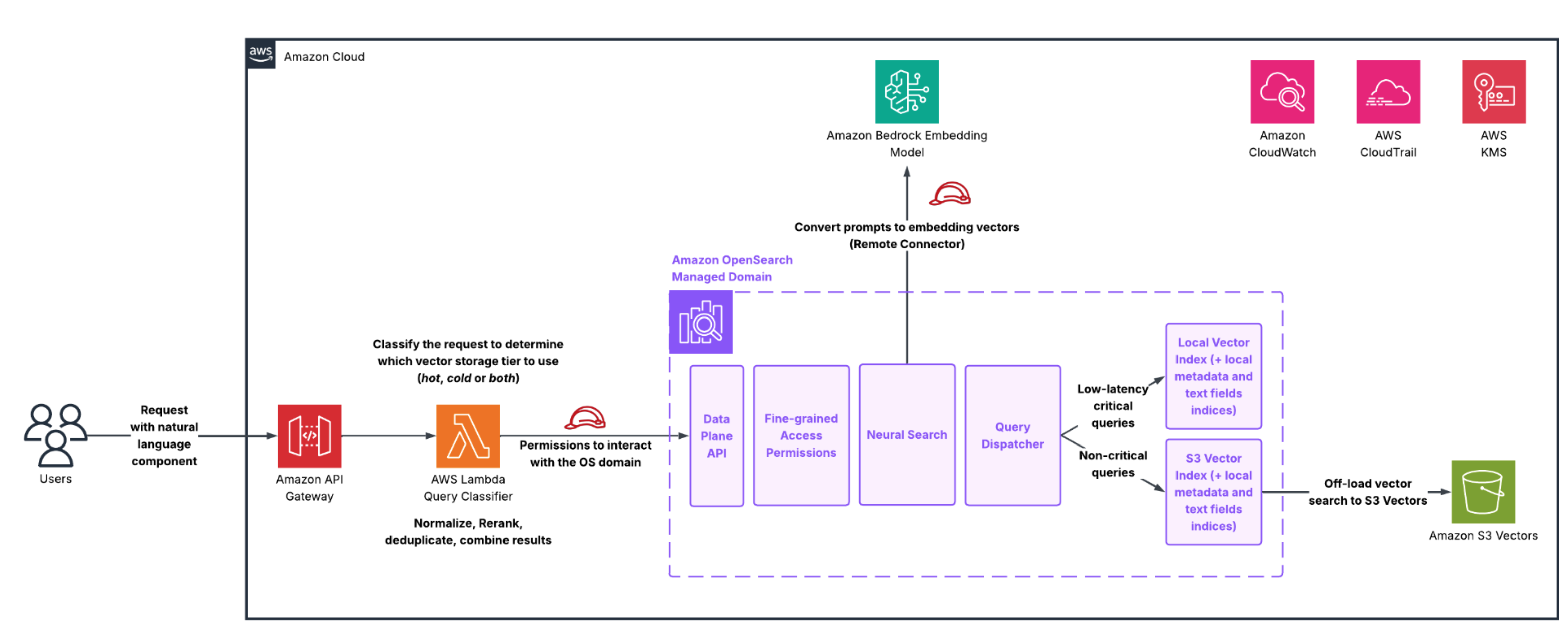
For this workload, a native OpenSearch vector index can hold the high-priority corpus. That index is a fit for requests with tight latency objectives, frequent queries, or sustained throughput requirements. A second index in the same OpenSearch managed domain can use the S3 Vectors engine for the larger, lower-frequency corpus. Because S3-backed search is designed for sub-second retrieval at lower cost, it can be appropriate for historical knowledge and reference material where the application has more latency tolerance [2][3][4].
The application can route requests according to intent. A question asked during an active incident might search the performance tier first, because current operational guidance is the most relevant and time-sensitive. A question about a discontinued feature can target the historical tier. For broad questions, the application can query both tiers and combine the returned candidates with its own ranking logic. That last step is application orchestration: using separate indices does not by itself guarantee that results from them are globally ranked together.
The tiers should not be treated as permanent labels for the content. Query frequency, document freshness, and business criticality change. A runbook that was rarely requested can become central during an incident, and an archived case can become useful after a product regression. Review query telemetry and retrieval quality over time, then decide whether selected vectors should move between tiers, be indexed in both tiers, or be routed differently. Where duplicate representations are used, define how updates and deletions propagate so a stale copy does not become the best-matching result.
Create Indexes with Different Vector Engines
The S3 Vectors engine is selected in the vector field mapping when the index is created. The OpenSearch documentation also supports using different vector engines for different vector fields within a single index. In practice, separate indices are often easier to reason about for a hot/cold architecture because they make routing, observability, and lifecycle policies explicit. The following mappings are simplified examples. Use the embedding dimension and similarity metric that match your embedding model and relevance testing [3].
An S3 Vectors-backed index for less frequently queried knowledge can be created as follows:
PUT knowledge-cold
{
  "settings": { "index": { "knn": true } },
  "mappings": {
    "properties": {
      "embedding": {
        "type": "knn_vector",
        "dimension": 3,
        "space_type": "l2",
        "method": { "engine": "s3vector" }
      },
      "title": { "type": "text" },
      "content": { "type": "text" },
      "document_type": { "type": "keyword" }
    }
  }
}
The three-dimensional vector in this example is only to keep the mapping compact. The actual dimension needs to be replaced with the dimension produced by the model that you have integrated in your workflow. With the S3 Vectors engine, vector data is offloaded to the S3 vector index, while fields such as title, content, and document type remain in OpenSearch storage. Documents can be ingested using the standard bulk API, and searches use the standard OpenSearch search API [3].
A native OpenSearch vector index for latency-sensitive content can be created as follows:
PUT knowledge-hot
{
  "settings": { "index": { "knn": true } },
  "mappings": {
    "properties": {
      "embedding": {
        "type": "knn_vector",
        "dimension": 3,
        "space_type": "cosine",
        "method": {
          "name": "hnsw",
          "engine": "faiss",
          "parameters": { "ef_construction": 128, "m": 24 }
        }
      },
      "title": { "type": "text" },
      "content": { "type": "text" },
      "document_type": { "type": "keyword" }
    }
  }
}
The second mapping uses the Facebook AI Similarity Search (FAISS) engine with a Hierarchical Navigable Small World (HNSW) method as an illustrative native vector-index configuration. The specified parameters, such as m and ef_construction, have a critical effect on the performance of the index, therefore index build time, memory requirements, recall, and latency must all be tested against representative traffic before selecting a production configuration. The main architectural point is that both indices can be accessed through the same OpenSearch domain while using different vector backends. The application uses the same OpenSearch API regardless of the chosen underlying backend technology.
Query the Tiers Through OpenSearch APIs
Once the indices are created, the application can issue standard k-nearest neighbors (k-NN) or approximate nearest neighbor (ANN) searches to either index. For example, a query to the historical knowledge tier can use the following request:
GET knowledge-cold/_search
{
  "size": 5,
  "query": {
    "knn": {
      "embedding": {
        "vector": [0.777, 0.482, 0.315],
        "k": 5
      }
    }
  }
}
The same request can target the native knowledge-hot index. For keyword-plus-semantic retrieval, use the appropriate hybrid query pattern supported by your specific index mapping and OpenSearch version. S3 Vectors-backed fields also enable metadata, k-NN, and hybrid query workflows, but they have engine-specific behavior. In particular, AWS notes that filtered vector search with the S3 Vectors engine applies the filter as a post-filter and uses an oversampling mechanism to balance recall and latency. It is a best practice to validate the results against real queries, especially when metadata filters significantly narrow the candidate set [3].
A common orchestration pattern is to define a retrieval policy before search begins. The policy can select the hot tier for requests that must answer quickly, search the S3-backed tier for historical or broad-coverage requests, or issue both searches for questions that span current and historical content. When results from two indices are combined, the application should normalize or fuse ranking scores deliberately and deduplicate documents using a stable source identifier. It is important to measure end-to-end latency as well as the latency of each individual search, because parallel retrieval and ranking can change the overall response time.
Operational Considerations Before Production
The first consideration is service compatibility. The OpenSearch S3 Vectors engine requires OpenSearch version 2.19 or later, OpenSearch Optimized instances, and the latest patch version for the selected OpenSearch release. You must enable the feature in the domain configuration and have the required permissions and encryption configuration in place. Enabling or disabling the engine triggers a blue/green deployment, so schedule the change and test it using the operational processes appropriate for your domain [3].
Treat the vector engine as an index-design decision. The s3vector engine can be specified only when the vector field mapping is created. Adding or changing the mapping to use that engine after index creation is not supported. If an existing index needs to move to the S3 Vectors backend, plan for a new index and a controlled reindex or ingestion process rather than assuming the backend can be switched in place. Also account for the documented k-NN query limit of k = 100 for S3 Vectors-backed fields [3].
Another important consideration before implementing the changes to production environments is to take the feature limitations into account before selecting the S3 Vectors engine for important data. OpenSearch documents that indices using the S3 Vectors engine do not support snapshots. Automated snapshots exclude these indices and manual snapshot requests for them fail. The same documentation lists limitations for split, shrink, and clone operations, UltraWarm, cross-cluster replication, radial search, and nested knn_vector fields. S3 durability is valuable, but it does not remove the need to design for application-level recovery, re-ingestion, and the consequences of accidental index deletion [3].
Finally, benchmark both tiers with representative embeddings, metadata, and query traffic. Important metrics to measure are recall and relevance alongside p50, p95, and p99 latency, throughput, indexing behavior, and total cost. Test both common queries and complex filtered queries. Measure how often the application needs to search both tiers, and check whether duplicated content creates inconsistent results. Savings at the storage layer only translate into a successful design when the user experience, retrieval quality, and operational model remain acceptable.
A More Flexible Shape for Vector Search
Tiered vector search is not about choosing cost over performance or performance over cost for an entire application. It is about making that trade-off per workload. Amazon S3 Vectors provides a cost-optimized solution for large vector collections, while Amazon OpenSearch Service lets organizations keep their established search APIs and use different vector engines for different retrieval needs [1][2][3].
For a knowledge assistant, that can mean retaining active product guidance and operational runbooks in a native OpenSearch vector index, while keeping historical documentation and lower-frequency knowledge in an S3 Vectors-backed index. The application can direct time-critical requests to the appropriate tier and search broader collections when the question calls for it. The result is an architecture that can better align query latency, retrieval coverage, and storage cost with the value of the data being searched.
A practical first step is to classify your current vector corpus by query frequency and latency objective, then build a small benchmark with one native index and one S3 Vectors-backed index. Use representative traffic to validate relevance, measure the full request path, and review the integration’s operational constraints before moving production data. With those measurements in hand, you can make tier placement an explicit architecture decision rather than a one-size-fits-all assumption.
What This Means for You
Tiered vector search offers a more flexible way to balance search performance, storage costs, and the growing demands of enterprise knowledge bases. By combining Amazon OpenSearch Service managed clusters with Amazon S3 Vectors, organizations can align vector storage with the needs of each workload rather than relying on a single tier for every use case.
For application teams, this means maintaining low-latency retrieval for critical queries while supporting larger knowledge collections through a more cost-effective storage option. Platform and infrastructure teams gain greater flexibility in managing storage and performance trade-offs, while data and AI teams can expand the information available to their RAG and knowledge-search applications without fundamentally changing their existing search workflows.
The key is to determine which workloads benefit most from each tier. Factors such as query frequency, latency requirements, data volume, security, and filtering needs should guide these decisions. Evaluating the architecture against representative workloads can help organizations identify opportunities to reduce storage costs while preserving the search experience their applications require.
What’s Next
The best way to evaluate tiered vector search is to start with a real workload. You may already have a large collection of historical documents, internal knowledge, or reference data that needs to be searchable but does not require the same latency as your most frequently accessed information.
Our team can help you assess whether that workload is a good candidate for Amazon S3 Vectors, understand the potential cost and performance implications, and determine how a tiered approach could fit into your existing Amazon OpenSearch Service architecture.
Ready to explore the possibilities? Contact us to arrange a conversation with our team. We will discuss your use case, answer your questions, and help you identify a practical next step toward a search architecture that meets your organization's needs.
References
[1] “Amazon S3 Vectors is now generally available with 40 times the scale of preview”, AWS News, 2 Dec 2025,
https://aws.amazon.com/about-aws/whats-new/2025/12/amazon-s3-vectors-generally-available/
[2] “Using S3 Vectors with OpenSearch Service”, AWS Docs,
https://docs.aws.amazon.com/AmazonS3/latest/userguide/s3-vectors-opensearch.html
[3] “Advanced search capabilities with an Amazon S3 vector engine”, AWS Docs,
[4] “Working with S3 Vectors and vector buckets”, AWS Docs,
https://docs.aws.amazon.com/AmazonS3/latest/userguide/s3-vectors.html
Relevant Success Stories
.png)
.png)
Book a meeting
Ready to unlock more value from your cloud? Whether you're exploring a migration, optimizing costs, or building with AI—we're here to help. Book a free consultation with our team and let's find the right solution for your goals.