
Build ML Models Without Writing Code: A Practical Guide with Amazon SageMaker Canvas and Databricks
Many teams today sit on valuable data but struggle to turn it into machine learning models. The challenge is often not the lack of ideas, but the lack of time, specialized coding skills or engineering capacity. Business analysts understand the data. Data engineers manage the pipelines. But building and deploying models still feels like a task reserved for experienced data scientists.
With tools like Amazon SageMaker Canvas and Amazon SageMaker Data Wrangler, this is changing. You can now connect to enterprise data sources such as Databricks, prepare and explore your data visually, train models using built-in AutoML capabilities and even deploy them to production : all without writing a single line of code. In this post, we walk through how this works in practice and what it means for teams who want to move faster in the era of machine learning.
From Databricks to Canvas: Connecting to Your Data
For many organizations, Databricks is the foundation of their data strategy. It acts as a central lakehouse where raw and curated data is stored, transformed and explored. Data engineers build pipelines there, analysts run queries and create views, governance and access controls are already in place. The data platform is mature, trusted and deeply integrated into daily operations.
But when the business decides to move from dashboards to predictions, a new question appears: how do we turn this existing data into machine learning models without redesigning the architecture or exporting large volumes of data into new systems?
This is where Amazon SageMaker Canvas becomes a powerful extension of the existing environment rather than a replacement for it.
Canvas allows you to connect directly to Databricks using a JDBC connector. Once configured, Canvas can access your tables just like any other supported data source. The key requirement is that the data source must be reachable from the Canvas application. If Canvas is running in VPC-only mode, you need to ensure that the appropriate networking configuration and routing are in place so the connection can succeed [1].
This direct integration changes the way teams think about cross-platform machine learning. Databricks continues to serve enterprise data engineering and analytics at scale. SageMaker Canvas focuses on accelerating machine learning outcomes with low-code/no-code approaches. Each platform plays to its strengths, and they complement each other rather than compete.
Exploring and Preparing Data with Data Wrangler
Once your data is available in Canvas, the next step is understanding it. This is where Data Wrangler becomes especially powerful.
Data preparation is often the most time-consuming part of any machine learning project. With Data Wrangler, you can visually select, import and transform data using SQL and more than 300 built-in transformations. AWS claims that you can “scale to prepare petabytes of data without coding PySpark or spinning up clusters” [2]. This allows teams to start small with samples for rapid iteration and then confidently run the same transformation flows on large production-scale datasets within the same environment.
When you first import your data, Canvas generates rich quality insights. You can review missing values, detect outliers, identify duplicate rows and understand distributions across features. For classification or regression use cases, you can even run a quick model to estimate baseline performance. This quick model provides an early signal of the accuracy you might achieve, along with insights into target column distribution and feature importance. You simply select an appropriately sized ML instance and the number of instances, and Canvas handles the processing.
If you are working with large datasets, you can sample your data to preview transformations and observe how they affect the underlying data faster. This optimization allows you to iterate quickly during the data wrangling phase, then scale up once you are satisfied with the transformation pipeline. As already mentioned, Data Wrangler can also scale to process very large datasets when needed, so you are not limited by early experimentation choices.
As you start transforming your data, you can use the natural language interface to describe all of your preprocessing logic. For example, you might ask to fill missing values, encode categorical variables or normalize specific columns. Canvas generates the corresponding PySpark code behind the scenes and provides it back to you before adding the transformation step in the data flow. This provides transparency and an additional layer of human validation, even in a no-code workflow. You can move faster with a simplified, no-code experience, while still maintaining full visibility and control over what is happening in your data pipeline.
Over time, you build a clear and reproducible transformation pipeline that prepares your features for modeling. If you plan to reuse these features across projects or run multiple model trials for the same business case, you can store them in Amazon SageMaker Feature Store for consistent use. Data Wrangler also allows you to export your full transformation flow as Jupyter notebooks or Python scripts, making it easier to integrate with existing development workflows, apply version control and align with your organization’s software engineering standards [2].
Training Models with Built-In Intelligence
After preparing your dataset, you can move directly into model building within SageMaker Canvas. Once you provide the necessary dataset and point out the target column, the service automatically recommends the appropriate model type based on your data and prediction goal. This built-in intelligence reduces the guesswork that often slows down early-stage projects. At the same time, you still have the flexibility to adjust advanced settings when needed. You can choose the model type, define the objective metric and select the training approach : such as Auto, Ensemble or Hyperparameter Optimization (HPO), similar to the SageMaker Autopilot capabilities available in Amazon SageMaker. This gives you a balance between guided automation and deeper configuration control. Beyond standard tabular problems with numeric or categorical data, Canvas also supports image analysis, text analysis, time series forecasting and even fine-tuning foundation models for large language (or even small language) model use cases, allowing you to address a broad range of business scenarios within the same no-code environment. [3].
You can also pick between building a quick model and a standard model. A quick model is optimized for speed and provides a fast baseline - similar to the model built during the data insight analysis step. A standard model takes much longer to train but typically delivers higher accuracy - as it runs multiple trials, performs hyperparameter optimisation, etc. This flexibility allows you to balance time and performance depending on your business needs [3].
Once training is complete, Canvas provides clear metrics on model performance using test data. You can review accuracy scores and examine feature importance to better understand which variables influenced the model’s predictions. These visual explanations make it easier to build trust with stakeholders who want transparency into how decisions are made.
From Model to Insight: Predictions and Integration
Training a model is an important milestone, but the real value comes from putting that model to work in everyday decision-making.
With Amazon SageMaker Canvas, you can immediately start generating predictions once your model is trained. For larger datasets, batch predictions allow you to score entire tables in an offline mode, which is useful for periodic reporting and campaign targeting. For more interactive use cases, single predictions let you evaluate individual records on demand. In both cases, prediction outputs are stored in Amazon S3 and can be previewed directly within Canvas, making it easy to validate and share results.
For organizations that rely on Amazon Quick for dashboards and reporting, the integration goes one step further. You can send your trained model from Canvas to Quick and use it as a predictive field within a dataset. A predictive field allows dashboard users to generate real-time predictions directly inside their analytics environment, without switching tools or manually exporting results. From their perspective, predictions become just another field in the dataset - fully integrated into visualizations, filters and reports.
To enable this workflow, both services must be set up in the same AWS Region and the appropriate permissions must be configured. Once in place, this connection bridges machine learning and business intelligence in a seamless way [4].
The result is that machine learning does not remain isolated in a technical environment. Instead, predictions flow directly into the dashboards and reports where business users already operate, turning insights into immediate, actionable outcomes.
Deploying to Production in a Few Clicks
For teams that are ready to move from experimentation to real-world usage, Amazon SageMaker Canvas also supports real-time deployment directly from the same interface. Once your model is trained and validated, you can deploy it as a managed inference endpoint without writing code or switching to another service.
During deployment, Canvas suggests a default instance type and instance count based on your model and use case. You can accept these recommendations or adjust them to match your performance and cost requirements. The infrastructure provisioning, scaling configuration and endpoint setup are handled automatically in the background [5].
This significantly lowers the barrier between model development and production. There is no need to rebuild the model in a separate environment or translate your work into custom deployment scripts. The exact model you designed and evaluated in a visual workflow can become a live, real-time endpoint in just a few steps - ready for applications to send requests and receive predictions instantly.
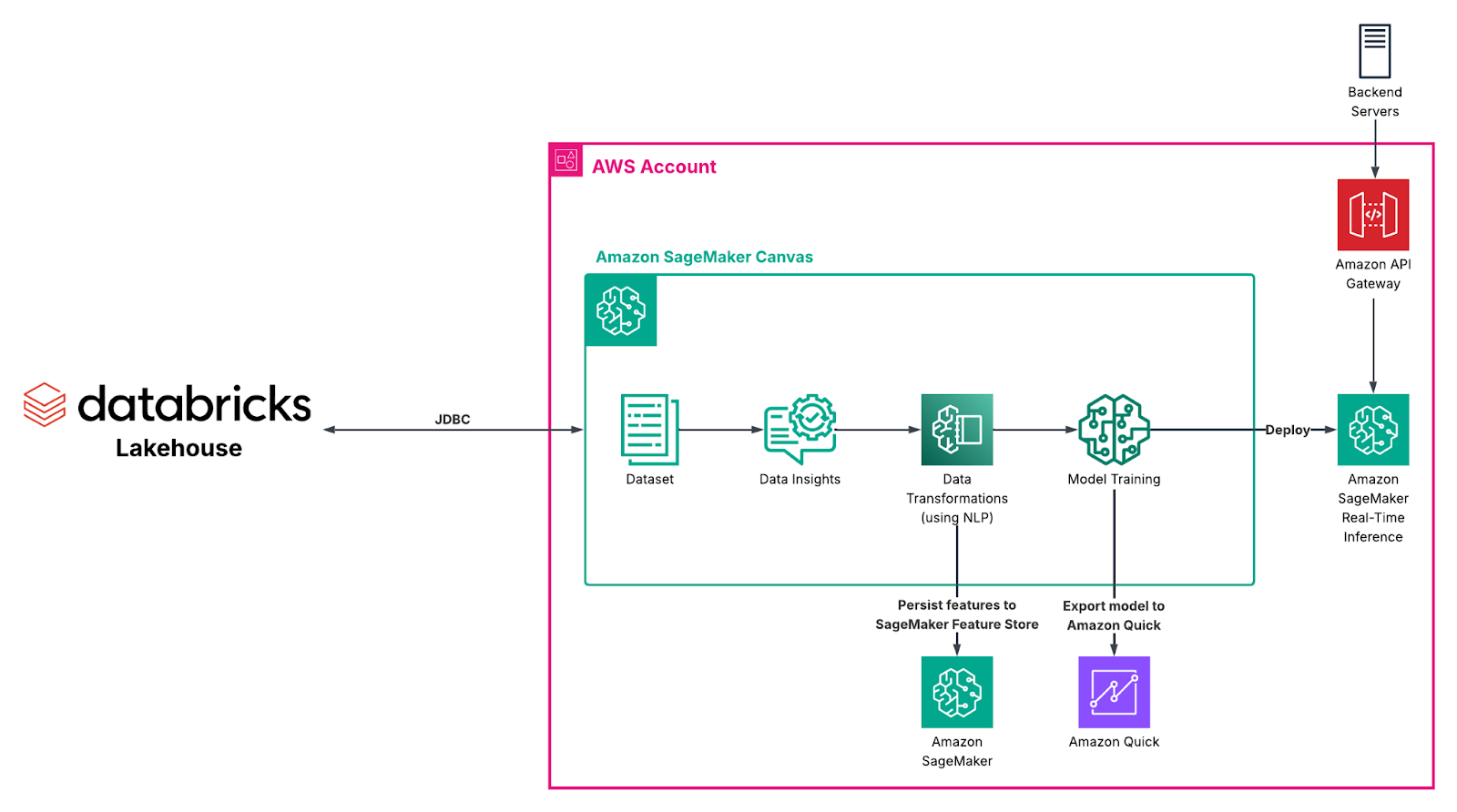
Figure 1. “End-to-end model training pipeline in Amazon SageMaker Canvas”
What This Means for You
Bringing together Databricks and SageMaker Canvas allows you to connect centralized organization-wide data lakehouses with no-code machine learning in a seamless way. You can explore and transform data with Data Wrangler, validate your preprocessing logic with quick models, train production-ready models with built-in recommendations and deploy or integrate them into analytics workflows : all without writing any code.
Whether you are a business analyst, a data engineer supporting multiple teams or an organization looking to integrate AI, this approach helps you move faster. You reduce dependency on specialized ML resources, shorten the time from idea to deployment and maintain alignment with your existing AWS architecture.
Most importantly, you empower more people in your organization to turn data into action.
What’s Next?
If you are already using Databricks and AWS, this integration is a natural next step. Start by connecting your data through JDBC, explore it with Data Wrangler and experiment with a quick model to see what insights you can unlock.
Machine learning no longer needs to be a separate, complex initiative. With the right tools, it becomes an extension of your existing data workflow : simple, visual and production-ready from day one.
If you would like guidance on architecture, networking setup, governance or best practices for deploying models in your environment, our AWS experts are available to help. You can book a session with our team to explore how this cross-platform approach can fit into your current data landscape and accelerate your ML initiatives with confidence.
References
[1] “Connect to data sources”, AWS Docs,
https://docs.aws.amazon.com/en_us/sagemaker/latest/dg/canvas-connecting-external.html
[2] “Amazon SageMaker Data Wrangler”, AWS Docs,
https://aws.amazon.com/sagemaker/ai/data-wrangler/
[3] “Build a model”, AWS Docs,
https://docs.aws.amazon.com/sagemaker/latest/dg/canvas-build-model-how-to.html
[4] “Send your model to Quick”, AWS Docs,
https://docs.aws.amazon.com/sagemaker/latest/dg/canvas-send-model-to-quicksight.html
[5] “Deploy your models to an endpoint”, AWS Docs,
https://docs.aws.amazon.com/sagemaker/latest/dg/canvas-deploy-model.html
Relevant Success Stories
.png)
.png)
Book a meeting
Ready to unlock more value from your cloud? Whether you're exploring a migration, optimizing costs, or building with AI—we're here to help. Book a free consultation with our team and let's find the right solution for your goals.